Actions, never keys
The first thing you would write in a game is "if Enter was pressed, plant a seed". It works, and it is a bug waiting to happen. Players rebind every key and button, a controller has no Enter, and two keyboard layouts already use different keys. A key written into a game's code, or into text a player reads, stops working after a rebind, or it lies: the help line says "press Enter", and Enter does nothing.
So the code never asks about keys. A screen reacts to the game's actions, the things a player can ask for (Up, Confirm, Plant). The keymap file says which keys and buttons give them, and text names a key through the player's keymap. Then every player can change their keys, a controller just works, and the help line is always right:
In files/keymap.ron:
- "Confirm": ["Enter", "Space", "z"],
+ "Confirm": ["Space", "Enter", "z"],
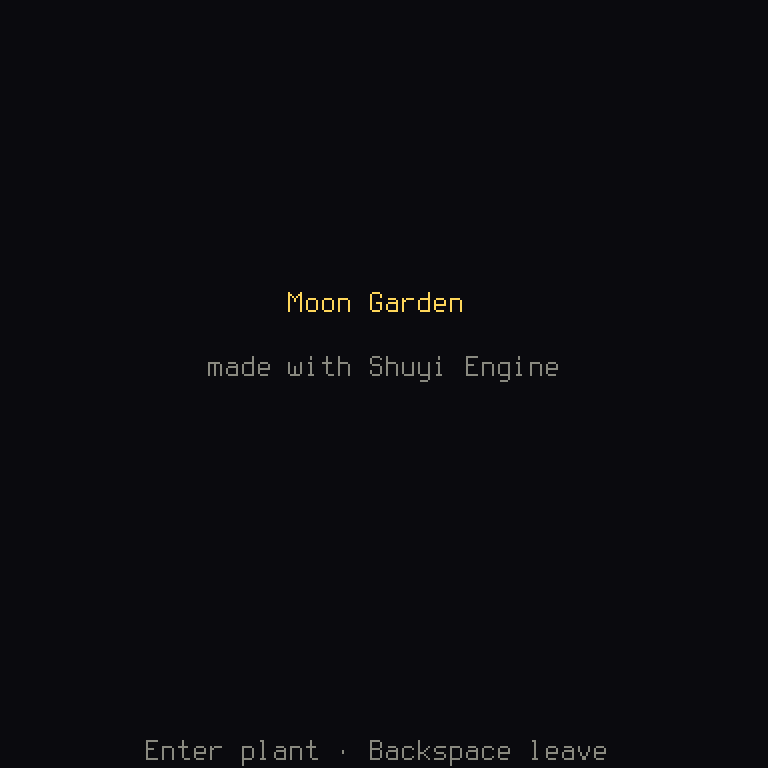
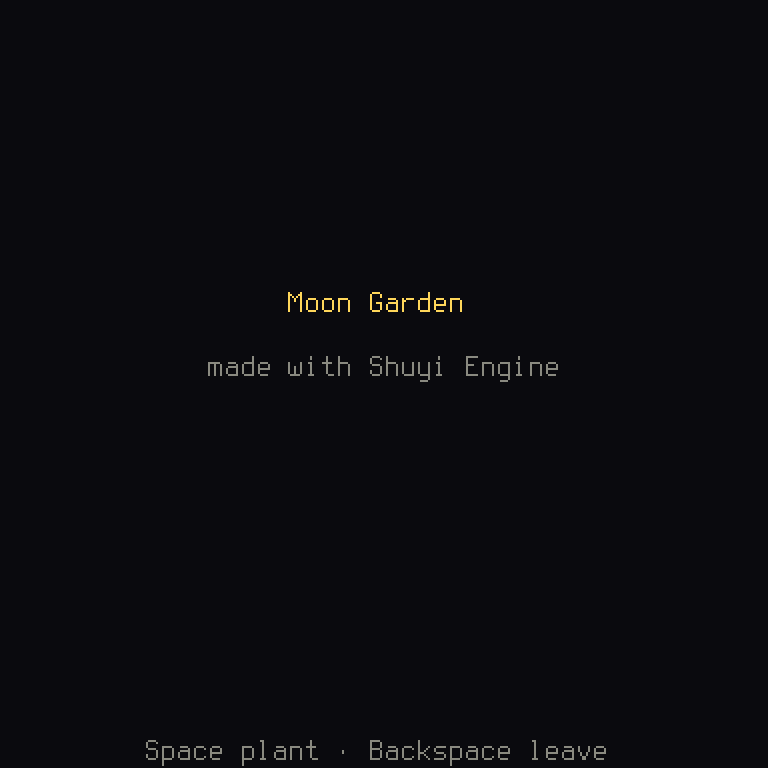
Only one file changed. The help line is text that asks the keymap for the key, so it followed.
Reacting to an action
A screen's update gets a FrameInput of the game's actions: input.actions holds
those pressed this frame, and input.is_held(action) says whether one is held down. A
held action that repeats comes again at the keymap's repeat rate, so a screen never times
key presses itself. When the game comes back from a suspend (the device slept, or the
player switched apps), or its window loses focus, nothing is held any more: a key let go
while it was away doesn't stay held, and one still down counts once it is pressed again.
While the window has no focus the controllers do nothing. The garden's update, in
chapter 2, turns each action
into a command of its rules.
Each screen declares the actions it reads, in Screen::actions. cargo shuyi check --target all checks that the required ones bind to distinct inputs of each target the
game ships on (a target is a kind of machine a game runs on, and "distinct" means no
two need the same button), and in tests the Harness hands a screen only the actions it
declares. A screen that declares none (None) counts as reading every action, and the
check warns about it.
The keymap file
files/keymap.ron gives each action, by its name, up to three key chords in each
layout. A chord is a key with any keys held with it, such as Shift+a, or just a,
and a layout is one complete set of keys for a player to pick:
    layouts: [
        (
            id: "Arrows",
            name: "layout.arrows",
            keys: {
                // Held, they repeat.
                "Up": ["Up", "w"],
                "Down": ["Down", "s"],
                "Left": ["Left", "a"],
                "Right": ["Right", "d"],
                "Confirm": ["Enter", "Space", "z"],
                "Cancel": ["Backspace", "x"],
            },
        ),
    ],
It also gives each action's controller buttons, named by their place on the pad (South,
East, DpadUp), never by a label such as "A", since the same place has a different
label on another make of pad. Then come the timings of repeated keys, and how far a stick
goes before it counts as pushed:
    // Buttons by their place on an Xbox-shaped pad.
    pad: {
        "Up": ["DpadUp", "LeftStickUp"],
        "Down": ["DpadDown", "LeftStickDown"],
        "Left": ["DpadLeft", "LeftStickLeft"],
        "Right": ["DpadRight", "LeftStickRight"],
        "Confirm": ["South"],
        "Cancel": ["East"],
    },
    // Each target's own buttons, by its profile's id, for a target with
    // no keyboard; desktop and web play with the keys above.
    targets: {},
    repeat: (delay_ms: 300, interval_ms: 70),
    stick: (press_percent: 50, release_percent: 35),
Plain Escape and Delete may not appear: the rebinding screen keeps them, Escape to back
out of a capture and Delete to empty a slot. cargo shuyi check reads the file and names
a wrong line. On a Nintendo-style pad the engine swaps Confirm and Cancel by itself.
Naming a key in text
In the language file, an action's name in braces shows the player's own key for it, and
{Cursor} the four direction keys:
    // The garden.
    "garden.seeds": "{seeds} seeds left",
    "garden.help": "{Cursor} move · {Confirm} plant · {Cancel} leave",
    "garden.won": "Every plot grows. {Confirm} back",
    "garden.lost": "Out of seeds. {Confirm} back",
ctx.text_with("garden.help", &[]) gives "arrows move · Enter plant · Backspace leave"
with the default keys, and other words once the player rebinds. Text built in code names
a key with key_name, and passes it in as an argument:
/// "Enter plants", or whichever key the player put on Confirm: text built
/// in code names a key through the player's keymap, never by its name.
Rust:
&Ctx<Data>lends the function the context, to look at.&[("key", &key)]lends a list of pairs, each a tuple, values side by side: here the placeholder's name, and what to put there.
So a placeholder's first letter says who fills it. A capital, {Confirm}, names a key: an
action of the game, or {Cursor}. Lowercase, {seeds} or {key}, is a value the screen
passes. cargo shuyi check fails on a capitalized name that is no action.
Both follow the device the player pressed last: keys on the keyboard, the pad's own
button names on a controller. An optional action may have no key; the text then shows the
language's keys.not_mapped words.
cargo shuyi lint fails on a key named in the game's code or text, with its file and line
(problem code SH2101).
Rebinding
The engine's Key bindings screen (shuyi::ui::screens::key_bindings) lets the player
rebind three key slots and three button slots for each action, and saves them in the
player's profile. It refuses to close while a required action has no key or no button. A
keymap file with several layouts lets a player pick one on the layout picker the first
time the game starts.
You don't write any of this. It works since your code only ever asked for actions.
Actions of a game's own
The short path plays with UiAction's six moves, which the engine's menus and screens
react to too. A game that needs more (a watering can, a debug key) writes its own action
enum, a type that is one of a fixed list, and implements ActionSet for it. A
trait like ActionSet is a list of functions that a type promises to have:
/// The actions of a garden game that needs more than the six moves: a
/// watering can, and a key to leave with.
ALLlists every action in order, andnamegives each one's name in the keymap file and the player's saved keys;is_repeatable,is_required(the player must keep a key and a button on it) andis_rebindablesay how each behaves;groupsays which actions may share a key (()when none may);uisays what the engine's widgets take each for, so menus keep working;fixed_keysgives keys no player can move.UiActionhas one, plain Escape for Cancel; this game has none.
Rust:
Selfis the type thisimplis for, soSelf::LeftisGardenAction::Left.const ALL: &'static [Self]is a fixed list, kept for as long as the program runs.selfwith no&takes the value itself, which is cheap here, asCopyin thederiveline says a value this small is simply copied.
matchhandles every possibility.matches!(self, Self::Left | Self::Right)is a short way to ask "is it one of these?".type Group = ();fills in one of the trait's blanks, with(), a value holding nothing. Sofn group(self) {}has nothing to give back, and an empty body does it.
The game's data becomes BasicData<GardenAction, Plan> and its game BasicGame<GardenAction, Plan>, and its keymap file names every action of ALL:
    layouts: [
        (
            id: "Arrows",
            name: "layout.arrows",
            keys: {
                "Left": ["Left", "a"],
                "Right": ["Right", "d"],
                "Plant": ["Enter", "Space"],
                "Water": ["w"],
                "Leave": ["Backspace"],
            },
        ),
    ],
    pad: {
        "Left": ["DpadLeft", "LeftStickLeft"],
        "Right": ["DpadRight", "LeftStickRight"],
        "Plant": ["South"],
        "Water": ["West"],
        "Leave": ["East"],
    },
An engine screen declares the game's actions for the UiActions it reacts to with
shuyi::ui::input::ui_actions.
Tests
Harness scripts press the game's default keys by name (h.keys("Enter Right")),
h.pad("South") presses a button by its place, and h.act(action) presses whatever key
the player bound to an action. A test of rebinding rebinds in the test, then presses the
new key.
When it goes wrong
cargo shuyi check reads the keymap and the language file, and these are its real
answers.
A misspelled action. It says what it knows, and that the real one is now missing:
check: 2 error(s)
  files/keymap.ron:17: error[SH2008]: layout "Arrows": unknown action "Confirn"; known actions: Up, Down, Left, Right, Confirm, Cancel
  files/keymap.ron: layout "Arrows": missing action "Confirm" (list it with [] to leave it unbound)
help[SH2008]: use one of the names the message lists, or fix the spelling
A misspelled key:
files/keymap.ron:18: error[SH2008]: layout "Arrows": action "Cancel": unknown key chord "Backspce"; expected a key such as "h", "0", ";", "Left", "Enter", "Escape", "Space", "Tab", "Backspace" or "F1", optionally prefixed by "Shift+"
A key the rebinding screen keeps:
files/keymap.ron:18: layout "Arrows": action "Cancel": "Escape" can't be bound here: Esc and Delete are fixed, see controls.md
An action misspelled in the language file. check lists the actions and
{Cursor}, as the names a capitalized placeholder may use:
check: 1 error(s)
  files/en.ron:15: error[SH2008]: "title.help": unknown action "{Confirn}"; known actions: Up, Down, Left, Right, Confirm, Cancel, and {Cursor} for the cursor keys
help[SH2008]: use one of the names the message lists, or fix the spelling
cargo shuyi lint reads your code and your text, and finds a key named in either:
lint: 1 finding(s)
  crates/game/files/en.ron:11: error[SH2101]: text tells the player to press "Enter": "Press Enter" — react to an action (the keymap names the keys), or name a key through the player's keymap
help[SH2101]: react to an action instead, and name a key in text through the player's keymap
One more reaches neither:
A screen reads an action it didn't declare. Take UiAction::Left off the garden's
actions, keep reading it in update, and in a test the Harness holds it back, so Left
does nothing. A test that walks left then fails, with the plot it stayed on:
assertion `left == right` failed
  left: 2
 right: 1
If a key does nothing in a test, look at the screen's actions first.