A game and its screens
Think of what a game shows you: a title, then the game itself, then perhaps a pause menu on top of the game, then "Are you sure?" on top of the menu. When you back out, each goes away and the one below is there again, as you left it.
That is exactly how a game on Shuyi Engine is built. Each of those is a screen,
and the screens sit on a stack, one on another, like a pile of cards. Only the
screen on top reads the player's input, and the screens below it wait. They all
share one context, Ctx, which holds the game's data and everything the engine
offers them.
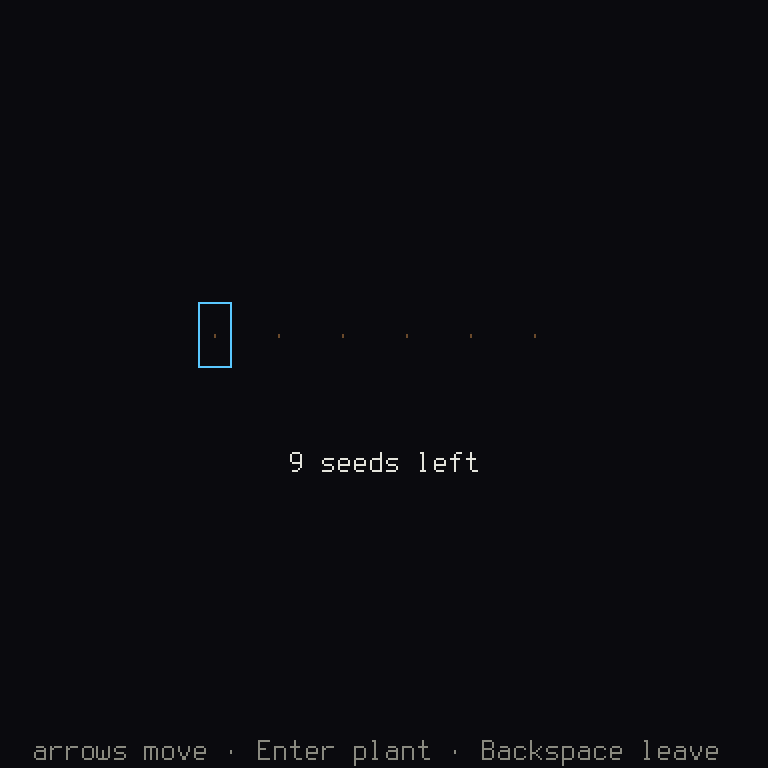
Moon Garden has three screens. This is the second, the garden:
A screen
A screen is a Rust type with a few jobs. Here is Moon Garden's title, the whole of it. Don't worry about reading all of it at once, as the notes below take it apart:
/// What the title shows: plain data, built from the game's text.
/// The title, the game's first screen.
;
A screen has four jobs:
nameis a stable id insnake_case(lowercase, words joined by_), for tests and the tools. The comment above it tells the text check that this isn't text a player reads.actionsdeclares every action the screen reads. An action is something a player can ask for, like Confirm. The tools check that they fit each target's buttons, and in tests a screen gets only the actions it declares (chapter 3).updateruns once a frame while the screen is on top. It reads the frame's actions and answers with aTransition, what the stack should do next. Cancel quits only wherectx.platform.can_quit(): on the web, the player closes the tab instead (chapter 9).drawpaints the screen into the frame. Here it paints the view, plain data built byview. Chapter 4 says why the two are apart.
Rust: a
structgroups named values into one type, andTitleViewhas threeStrings, pieces of text.pub struct Title;is a struct with nothing in it, as the title has nothing to remember.#[derive(...)]asks the compiler to write some standard abilities for you, such asClone(make a copy) andPartialEq(compare with==).
impl Title { ... }adds functions to a type.impl Screen<Data> for Titleis different:Screenis a trait, a list of functions a type promises to have, and this keeps that promise.selfis the value a function was called on.&selfmeans it only looks, and&mut selfmeans it may change it, and the compiler holds you to that:drawtakes&selfand&Ctx, so a screen can't change anything while it draws. The tutorial goes through a screen like this one line by line.
Option<Vec<UiAction>>is maybe a list of actions, andSome(...)means here it is.&&means "and also".returnhands back an answer early.&'static stris a piece of text that's built into the program.let c = |color| ...is a small nameless function, kept in a name for the next few lines.i32is a whole number that may be negative, andi32::fromconverts to it.
The stack
update answers with what the stack does next. A Transition is an enum, a type
that's exactly one of a fixed list of possibilities:
Transition | Does |
|---|---|
None | stays |
Push(screen) | puts a screen on top of this one |
Pop | closes this one: the one below is on top again; the last one quits |
Transition::pop_with(value) | closes this one and hands value to the one below |
Replace(screen) | swaps this one for another |
Quit | leaves the game |
Push holds the screen in a Box, written Box::new(Title). Screens are different
types with different sizes, and a box lets the stack hold any of them.
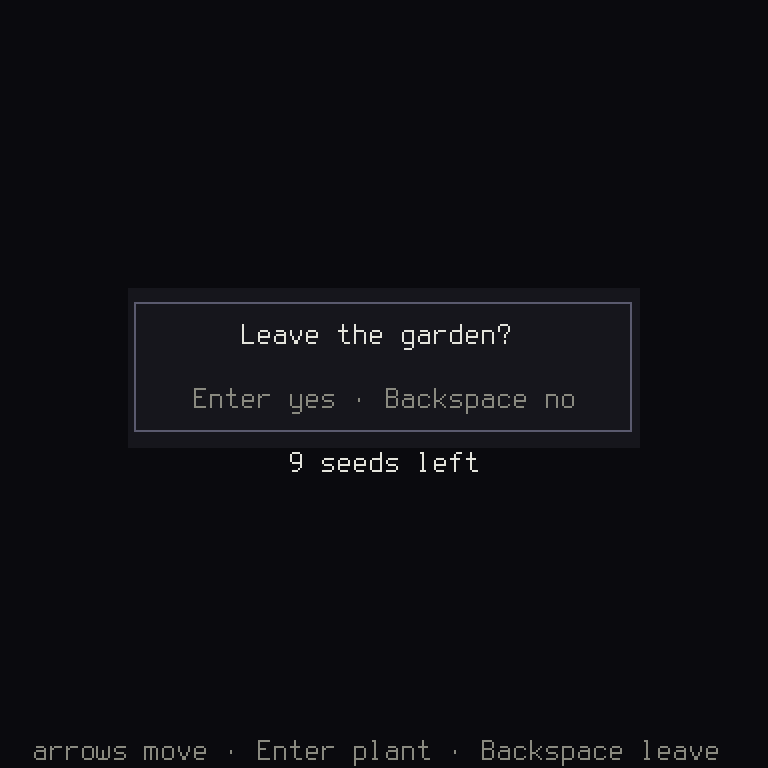
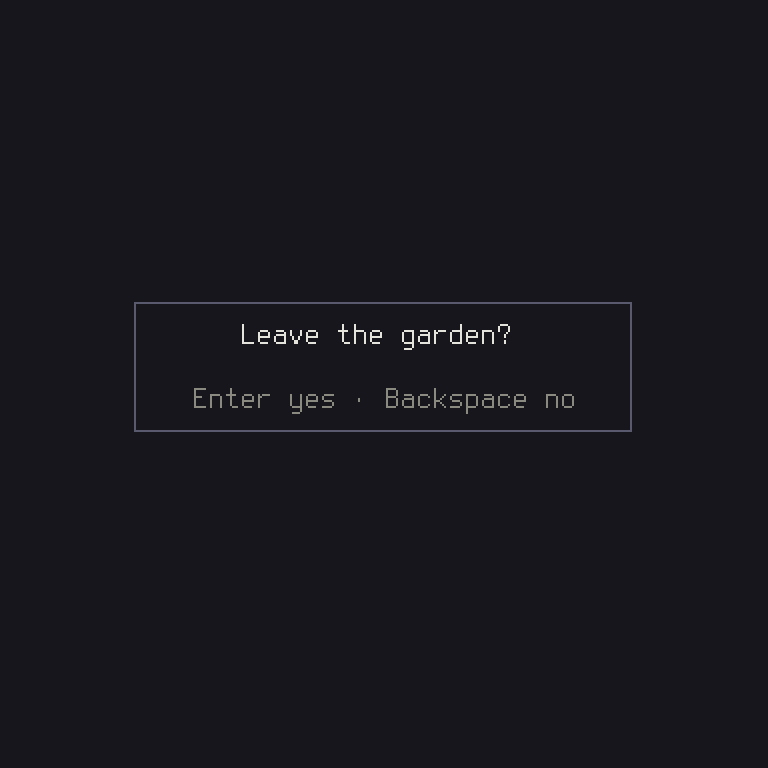
A screen whose is_overlay is true lets the one below show through: the stack draws
the one below first, then it. That's one word in the code, and you can see it:
In src/screens.rs:
- fn is_overlay(&self) -> bool {
-         true
+ fn is_overlay(&self) -> bool {
+         false
Asking the screen below
Often a screen wants to ask something and act on the answer: "Leave the garden?". You could put a yes-or-no mode in the garden itself, but then every screen that asks a question grows a mode. Instead, a question is a screen of its own. The garden pushes "Leave the garden?" over itself when the player presses Cancel:
/// "Leave the garden?", asked over it: it pops with the answer.
;
Rust:
for &action in &input.actionsruns once for each action this frame. Amatchpicks the arm that fits, and must handle every possibility, which is why there's an arm of_ => {}:_is "anything else", and{}is doing nothing.
The question pops with the answer, and the stack hands it to the screen below in
uncovered. The garden reads it as the type the two agree on, here a bool, which
is true or false:
/// The garden: the player walks along the plots and plants seeds. Its
/// state is the rules' ([`Garden`]), changed only by commands.
The transition uncovered returns applies at once, so a screen acts on the answer in
the same frame. A screen also hears when one is pushed over it, in covered.
Rust: there's a lot here, so one at a time.
Selfis the type thisimplis for, andSelf { garden: ... }makes one.pub(crate)means only code in this crate may reach the field._as a parameter's name, as in_: &mut Ctx<Data>, means a function takes the value and doesn't use it.
UiAction::Confirm if self.garden.outcome().is_some() => ...is a match arm with a guard: it only fits if theifis true too, and otherwise the next arm gets its chance.continueskips to the next time round the loop.
self.garden.apply(&command)gives back aResult, either a value (Ok) or what went wrong (Err). Rust warns if you ignore one, andlet _ =says you mean to.
result.and_then(ScreenResult::take::<bool>)opens theOption, if it's there, and takes aboolout of it, if that's what it holds.::<bool>names a blank in that function, the type to look for. If the question had popped with some other type, this would beNone, and the garden would stay.
as_anylets a test find this screen on the stack, with its real type.dyn Anyis Rust's "a value of some type, to be asked which". Without it, a test'sh.screen::<GardenScreen>()gets aNone.
The garden's state isn't the screen's to change: it belongs to the rules, and the screen changes it only by sending commands. Chapter 6 writes them.
The context
Every screen needs to reach things: the game's text, its colors, the player's saves. Many engines keep these in globals, values anyone can reach from anywhere, which makes it hard to tell what a piece of code depends on, and hard to run two games side by side in a test. Here they all come in one value, handed to you.
Every update gets the context &mut, so it may change it, and every draw gets it
&, so it may only look. It is a plain struct, with no globals behind it:
ctx.gameis the game's data, the type the game names (Data); on the short path aBasicData, whoseownis the game's own part;ctx.text(key)andctx.text_with(key, args)give text by key in the player's language;ctx.palettegives colors by name,ctx.keymapthe player's keys,ctx.storagethe player's saves (chapter 7),ctx.settings()the player's settings;ctx.audiotakes the sounds a screen asks for, andctx.log(…)writes a line to the engine's log.
A screen asks for music by its cue in the game's audio manifest:
ctx.audio.play_music("garden") switches to a track, and ctx.audio.stop_music() fades
it out, both with the manifest's default fade. A screen that wants a slower or quicker
fade names its own, for that switch or stop only:
/// Leaving the garden: its music fades out over three seconds, slower
/// than the manifest's default fade. The next screen starts its own
/// track when it is ready.
A quiet moment before the next track is the screen's to time: it asks for the next track when the moment is over.
A game can also make a sound while it runs, from samples rather than a file: a synth, a
mod's sounds, sounds read from a file the player gives it. ctx.audio.add_sound(cue, samples) makes the samples a cue, and from then on it plays as a cue of the manifest
does. Samples::new takes 16-bit samples, and Samples::from_u8 8-bit ones, which old
formats keep:
/// A chime the game makes while it runs: a tenth of a second of a square
/// wave, written as 8-bit samples, made the cue `chime` and played. A cue
/// of the manifest's can't be made this way, and the log says why.
A sound made this way plays a minute at most, and those made hold 32 MiB at most,
together; past that, or under the name of a cue the manifest has, it is refused and the
log says why. ctx.audio.remove_sound(cue) frees it, and a play of it after that plays
nothing. In a test, h.added_plays() gives each play's samples.
A line of dialogue may have a voice: ctx.play_voice(line) says it, if the game has a clip
for it. A screen that moves on by itself once the line is said, as a visual novel's auto
mode does, asks ctx.voice_playing(), which names the line whose clip is sounding, or
None. The platform reports it before each frame, so a screen sees its own play_voice
from the next frame on: None is "over" only once the line has been heard. A clip whose
file is missing, or that loads too late, never sounds, so the wait also ends when the line
hasn't started half a second after it was asked for:
/// How long a line's voice may take to start before a screen stops
/// waiting for it: a clip that hasn't loaded by then is never played.
pub const VOICE_WAIT_SECS: f32 = 0.5;
/// Waits for a line's voice to end, so the screen can move on by itself.
/// The platform reports the clip from the frame after `play_voice`, so
/// `None` means "over" only once the line has been heard, or once it has
/// had time to start and didn't.
In a test, h.voice_length(seconds) gives every clip that length, and h.wait steps past
its end.
Text by key
No screen writes its text in its code. If it did, translating the game would mean
hunting through all of it, and fixing a typo would mean a rebuild. So the text is in
the game's language file, files/en.ron, each line with a name, called its key:
    // The title.
    "title.name": "Moon Garden",
    "title.subtitle": "made with Shuyi Engine",
    "title.help": "{Confirm} plant · {Cancel} leave",
ctx.text("title.name") is a key's text. ctx.text_with(key, args) fills its
placeholders: each {name} that args names, as in &[("seeds", &seeds)], and each
action's name, as {Confirm}, with the player's own key for it. In a grid game,
cargo shuyi lint finds text written in code (a blank game's shuyi.ron has no
check_text yet, and lint says so). The keys keys.not_mapped, keys.arrows, keys.chord_join
and layout.arrows are words the engine's own screens and help lines ask the game for.
Rust:
&[("seeds", &seeds)]lends a list of pairs.("seeds", &seeds)is a tuple, values side by side: the placeholder's name, and what to put there.&[]lends an empty list, for a line with only actions to fill in.
Every screen, on a list
game() names every screen the game can show (its .screens(…), in
chapter 1). cargo shuyi check --target checks the controls of each screen on that list, so a new screen goes on it.
The engine's own screens and widgets
Before writing a screen, look for it in the engine. The options screen, key rebinding,
the layout picker and player profiles are in shuyi::ui::screens, and a menu, a list's
focus, a question box, name entry and word wrap are in shuyi::ui::widgets. A
widget is a part of a screen, as a menu is. Each takes the game's rows or text, and
says what it shows as a view.
Word wrap measures in cells of the screen, with ctx.widths(): a Japanese character
takes two. English breaks at spaces. Japanese has none, so it breaks between any two
characters, but never before 。 or 、 and never after 「, as a reader of Japanese
expects. A key's name filled into a text, such as Left Shift, is never split across
two lines.
Modules
The default engine stays small, so a game doesn't pay for what it doesn't use.
Everything else is a module: a crate of the engine that a game turns on as a
feature of shuyi, an optional part of a crate, such as physics or online play.
cargo shuyi modules lists them by concern (perspective, bodies and motion, online
play, kind of game), each with its status, and cargo shuyi add <module> turns one on
in the game's Cargo.toml and copies its skill into .claude/skills/.
A game installs the modules it turned on once, with .modules(shuyi::enabled_modules)
on its BasicGame, so turning one on needs no change to its code. A module joins the
running game with hooks of its own, functions the engine calls at set moments, and
keeps its state on the context, where ctx.module_state::<T>() finds it.
A test of it
A test is a small program that runs your code and checks what happened. A test of screens plays the game with no window through the engine's Harness, pressing the game's default keys by name, and reads the stack:
Rust:
#[test]marks a function forcargo testto run.assert_eq!stops the test, as failed, if its two sides aren't equal.hneedslet mut, as pressing keys changes it: in Rust, a name can't change unless it says it may.
Chapter 8 has the rest of the Harness.
When it goes wrong
A screen forgets one of its jobs. Leave out draw, and the compiler says so, and
says what to write:
error[E0046]: not all trait items implemented, missing: `draw`
   --> src\screens.rs:102:1
    |
102 | impl Screen<Data> for GardenScreen {
    | ^^^^^^^^^^^^^^^^^^^^^^^^^^^^^^^^^^ missing `draw` in implementation
update doesn't answer. The last line of a function is what it gives back. Leave
out Transition::None at the end, and update ends on its loop, which gives back
nothing, ():
error[E0308]: mismatched types
    | |_________^ expected `Transition<BasicData<UiAction, Plan>>`, found `()`
A match misses a possibility. Remove the _ => continue arm, and the compiler
lists the actions you left out. It's one of Rust's most helpful errors, and it means
that adding a new possibility to an enum shows you every place that must handle it:
error[E0004]: non-exhaustive patterns: `shuyi::prelude::UiAction::Up`, `shuyi::prelude::UiAction::Down` and `shuyi::prelude::UiAction::Debug` not covered
A screen tries to change something while drawing. Rust stops it, because draw
only has &self:
error[E0596]: cannot borrow `self.garden` as mutable, as it is behind a `&` reference
A text key isn't in the file. This one compiles, and cargo shuyi check passes.
Running the game stops it in a debug build, with a panic, Rust's way of stopping
when something that should never happen did. It names the key:
text key not in the English text: "title.name"
So run the screens you change, or better, test them.
An action's name is misspelled in the text. {Confirn} names no action, and
cargo shuyi check fails on it, with its line:
check: 1 error(s)
  files/en.ron:15: error[SH2008]: "title.help": unknown action "{Confirn}"; known actions: Up, Down, Left, Right, Confirm, Cancel, and {Cursor} for the cursor keys
help[SH2008]: use one of the names the message lists, or fix the spelling
A capitalized name in braces is a key, and lowercase is a value the screen passes (chapter 3).
When a game outgrows the short path
The short path's parts grow one at a time, and the game's start stays as it is:
- actions of its own: an action set of the game's in place of
UiAction(chapter 3); - a part of its own: a map, a table of rules, read by the function
BasicGame::with_owntakes (chapter 5); - tools of its own: a scene, records and bots, through a
GameToolsof its own (chapter 10).
You can leave this section until you need it. A game whose data needs more than
BasicData has (sounds, voices, color themes, settings of its own) writes its own
GameData. Each method hands the engine a part it reads:
/// A game's data written by hand, for a game whose data outgrows
/// `BasicData`: its own sounds, voices, themes or settings. Each method
/// hands the engine a part it reads; the rest have defaults.
Rust: the
typelines fill in blanks of the trait.GameDataneeds to know this game's actions, colors, voices and settings, and(), a value holding nothing, says this game has none of its own.
Such a game makes its context with Ctx::new(data), its game with Game::new(ctx, first_screen, GameHooks::default()), and its binary calls shuyi::app::run with its
own window settings. The API docs of shuyi_ui and shuyi_app have the details.