Bots, replays and a frame
Play this step Its whole project
The game plays and looks just as it did in the last step. So why is this a step of its own? Because of how you'll keep it working. As a game grows, a change here breaks something over there, and no one can replay every level by hand after every change. So you teach the game to test itself.
Everything in this step is possible because of step 3. The rules are deterministic, so a game can be tested by playing it, and the same play always gives the same result.
| File | What changes |
|---|---|
crates/game/src/tools.rs | New: the game's own tools |
crates/game/src/stages.rs | tools() returns them |
crates/game/src/lib.rs | pub mod tools;, only for the tools build |
crates/game/src/rules.rs | Counts its turns, for bots |
crates/game/files/lines/1.ron to 5.ron | New: a winning line for each level |
crates/game/tests/tools.rs | New: tests through the tools |
crates/game/tests/frames/level1.txt | New: a frame kept as a file |
The game's own tools
cargo shuyi has run your game since step 1, using BasicTools, the engine's ready-made tools. Those can't know
about your rules: they have no idea what a move is. So the game now writes its own, Tools, which adds what's
special to this game, and calls BasicTools for the rest.
Shuyi:
GameToolsis the trait for that. It's the bridge between your game and the engine's tools, whether a person runs them from a terminal or a coding assistant calls them. YourToolsis in this step'stools.rs. Most of its functions just pass the call on toself.basic(). This page shows the parts that aren't that.
In lib.rs, the module is only part of a build with the tools in it, so it never ends up in the game you ship:
Rust:
#[cfg(feature = "tools")]means "only include this if thetoolsfeature is on". A feature is an optional part of a crate, listed in itsCargo.toml. That's what--features toolswas doing in theshuyialias, in your.cargo/config.toml, all along.
And stages::tools returns it:
/// The game's tools: the engine's, and its scene, bot and replay on top.
The scene: what a program can read
A person looks at the screen. A program needs the same facts as data:
/// The board's scene in `h`: its map, and what a program asks of it.
Try asking:
That plays those keys with no window, and answers with the map as text, plus your moves and won. json! writes
JSON, the most common format for programs to exchange data. Here is how a test uses it:
A bot
Game idea: a bot is a player made of code. It looks at the state, and picks the next command. Bots test a game from outside it, playing whole games in the blink of an eye. In a game with opponents, they can also be the opponents.
A bot needs to know who moves, for games with several players. The puzzle has one, so its side is (), a value with
nothing in it. It also needs to know the turn, so the puzzle now counts them. In rules.rs, add turn: u32 to the
state, start it at 1, and add 1 in apply. (u32 is a whole number that can't go below zero.) Then:
/// Who moves, for the bots: the puzzle has one player, so its side is `()`.
This bot isn't clever. It plays a line kept in a file: one in files/lines/ for each level, such as files/lines/2.ron:
// A line that wins level 2, one step a move.
[Right, Right, Down, Left, Left, Down, Right, Right]
Take the five from this step's copy. Those are the winning moves for each level, written by hand. Here's the bot that plays one:
/// A bot that plays a line kept in the game's files: each level's is in
/// `files/lines/`.
Rust:
Vec<Dir>read straight from the file byron::from_str, thanks to serde.steps.reverse()puts the last step first, because.pop()takes from the end of a list, and that's quick..or_else(legal)says "or, if that gaveNone, try this". So when the line is used up, the bot makes any legal step, and the turn limit will end the play.
Why does this matter? Here's the test:
It plays each level's line, and checks it wins. So every level is proven winnable, every time you run your tests. Edit a level so it can't be won, and this test fails, and says which one. For a puzzle game, that's the most valuable test there is.
To run the bot by hand:
The tools know how to do that because of playtest_plan, in tools.rs: one bot, line, with no checks to judge it,
each try played through the engine's play and kept as a record you can replay. Look it up in this step's copy.
A replay
A record is a level and its commands, and nothing more. Since the rules are deterministic, that's the whole play:
/// A record of a level: which one and the commands sent to its rules, and
/// what made it. The game's record format for `replay`.
Shuyi: the
replaytool plays a record twice and compares a hash of the state at every step. A hash is a short number worked out from all of a value, so if any of it changes, the number will too. So anything that isn't deterministic shows up at once, at the very step where it went wrong. If someone reports a bug, a record of what they did will reproduce it exactly.
made says which build made a record, since a record from another build may not play alike, and the tool refuses to compare those.
A frame
Most tests read the state. So how do you test a look? Here's the first level:
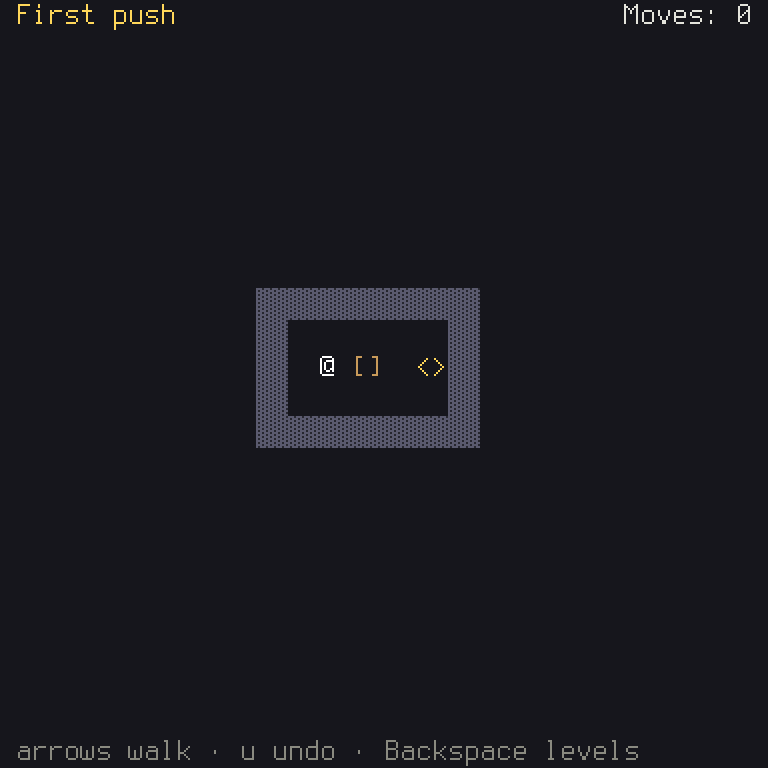
And here's the same frame as text. h.snapshot() gives you this, its characters first, and then a map of each cell's colors:
 First push                            Moves: 0


                ▓▓▓▓▓▓▓▓▓▓▓▓▓▓
                ▓▓          ▓▓
                ▓▓  @ []  <>▓▓
                ▓▓          ▓▓
                ▓▓▓▓▓▓▓▓▓▓▓▓▓▓


 arrows walk · u undo · Backspace levels
--- colours ---
abbbbbbbbbbaaaaaaaaaaaaaaaaaaaaaaaaaaaacccccccca
aaaaaaaaaaaaaaaaaaaaaaaaaaaaaaaaaaaaaaaaaaaaaaaa
aaaaaaaaaaaaaaaaaaaaaaaaaaaaaaaaaaaaaaaaaaaaaaaa
aaaaaaaaaaaaaaaaaaaaaaaaaaaaaaaaaaaaaaaaaaaaaaaa
aaaaaaaaaaaaaaaaaaaaaaaaaaaaaaaaaaaaaaaaaaaaaaaa
aaaaaaaaaaaaaaaaaaaaaaaaaaaaaaaaaaaaaaaaaaaaaaaa
aaaaaaaaaaaaaaaaaaaaaaaaaaaaaaaaaaaaaaaaaaaaaaaa
aaaaaaaaaaaaaaaaaaaaaaaaaaaaaaaaaaaaaaaaaaaaaaaa
aaaaaaaaaaaaaaaaaaaaaaaaaaaaaaaaaaaaaaaaaaaaaaaa
aaaaaaaaaaaaaaaaddddddddddddddaaaaaaaaaaaaaaaaaa
aaaaaaaaaaaaaaaaddeeeeeeeeeeddaaaaaaaaaaaaaaaaaa
aaaaaaaaaaaaaaaaddeefeggeebbddaaaaaaaaaaaaaaaaaa
aaaaaaaaaaaaaaaaddeeeeeeeeeeddaaaaaaaaaaaaaaaaaa
aaaaaaaaaaaaaaaaddddddddddddddaaaaaaaaaaaaaaaaaa
aaaaaaaaaaaaaaaaaaaaaaaaaaaaaaaaaaaaaaaaaaaaaaaa
aaaaaaaaaaaaaaaaaaaaaaaaaaaaaaaaaaaaaaaaaaaaaaaa
aaaaaaaaaaaaaaaaaaaaaaaaaaaaaaaaaaaaaaaaaaaaaaaa
aaaaaaaaaaaaaaaaaaaaaaaaaaaaaaaaaaaaaaaaaaaaaaaa
aaaaaaaaaaaaaaaaaaaaaaaaaaaaaaaaaaaaaaaaaaaaaaaa
aaaaaaaaaaaaaaaaaaaaaaaaaaaaaaaaaaaaaaaaaaaaaaaa
aaaaaaaaaaaaaaaaaaaaaaaaaaaaaaaaaaaaaaaaaaaaaaaa
aaaaaaaaaaaaaaaaaaaaaaaaaaaaaaaaaaaaaaaaaaaaaaaa
aaaaaaaaaaaaaaaaaaaaaaaaaaaaaaaaaaaaaaaaaaaaaaaa
ahhhhhhhhhhhhhhhhhhhhhhhhhhhhhhhhhhhhhhhaaaaaaaa
--- legend ---
a = fg:panel bg:panel
b = fg:highlight bg:panel
c = fg:text bg:panel
d = fg:border bg:wall_bg
e = fg:floor_fg bg:panel
f = fg:bright bg:panel
g = fg:box bg:panel
h = fg:text_dim bg:panel
Notice that the colors are named by their role (fg:box), not by a number. So this test doesn't fail if you make the box blue, as
that's a change of look on purpose, but it does if the box stops being drawn with its box color. The test compares this with the
file you keep:
/// Compares the first level's frame with the file kept beside this test;
/// `UPDATE_FRAMES=1` writes it, to read before keeping it.
To make the file the first time, or after you've changed a look on purpose, set UPDATE_FRAMES, which is what the test checks for:
UPDATE_FRAMES=1
On Windows, in PowerShell, the same thing takes two lines:
(In PowerShell, close that terminal afterwards, or that variable stays set.) Read the new file before you keep it. It'll be what the test holds the game to from now on.
Keep these tests few. A frame test fails on every change of look, while a test of the state only fails if something's really wrong. So test what happened through the state, as you've been doing, and keep a frame or two for the screens you care about most.
See them catch something
Change '@' to 'P' in Pieces, as you tried back in step 2, and run cargo test --workspace. the_first_level_looks_as_it_did
fails, and shows you the difference. Put it back. Now change one line of files/lines/1.ron, from [Right, Right] to [Right], and
run the tests: every_levels_line_wins_it fails, naming level 1. Put that back too.
That is the feeling you want. You can change anything, because if it breaks, you'll know within a few seconds.
What you learned
- Rust: features and
#[cfg]. - Game ideas: bots, records and replays, hashes, and when a test should read the picture.
- Shuyi:
GameTools, scenes for programs,Botandplay,replay, andh.snapshot().
Chapter 8 has more on testing, and chapter 10 on the tools. Next: hand it out.